Sponsored Content Disclosure: This article about AI and music was created in partnership with Ivory. Compensation was provided for publication. The views and opinions expressed are those of the author and Respect My Region. Readers should independently evaluate software features, pricing, and suitability before making purchasing decisions.
Transcribing a piano recording by ear , both hands, full chords, exact rhythms, takes training and time most musicians don’t have. AI transcription tools are now closing that gap, and the practical result is simple: you can convert an audio recording into a readable, editable score in minutes.
Why the score matters
A piano roll shows when notes happen. A score shows how the music is built : phrasing, voice leading, the relationship between the hands. If you want to learn a piece, teach it, perform it, or arrange it for other instruments, you need notation, not just audio. That hasn’t changed. What’s changed is who can get it.
What the Ivory tools do
According to Ivory, the platform is designed specifically for polyphonic piano transcription workflows. According to Ivory, the platform can identify chord structures, separate left- and right-hand piano parts, and generate editable sheet music outputs. You upload audio (or paste a YouTube link), and you get back a score you can actually read and edit.
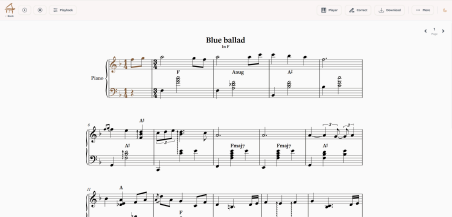
The key feature is MusicXML / PDF export. MusicXML is the standard format for digital notation, so a transcription opens directly in MuseScore, Sibelius, or Finale. From there you can correct mistakes, transpose, re-arrange, or print. The transcription is a starting document, not a locked file.
Who uses it
● Teachers convert a student’s recording or a reference track into notation for study and correction.
● Performers who learn by ear generate a score to confirm the details, then arrange or transpose it.
● Songwriters capture an improvisation at the piano and get sheet music before the idea is gone.
● Producers extract a part as readable notation to understand how it’s built before reworking it.
Fixing what AI gets wrong: the editor
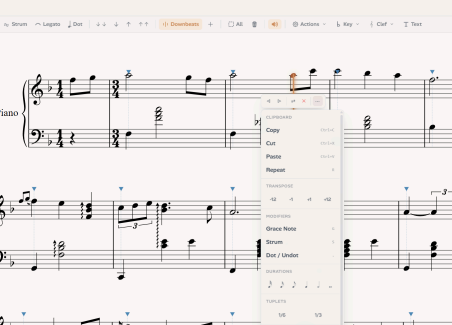
No AI transcription is perfect, and the honest selling point isn’t “flawless output”, it’s “good output you can fix fast.” That’s what the built-in editor is for. Once Ivory transcribes a piece, you’re not stuck with whatever the model produced. You can drag, resize, and delete notes directly, correcting any mistakes inside the same interface rather than exporting to another program first.
Two things make this practical. The first is that you’re editing in a familiar sheet-music view, so changes show up as readable notation, not raw data. The second is quantization, automatic cleanup of messy rhythms , which tidies complex timing into a legible score while keeping the natural feel of the performance instead of snapping everything rigidly to the grid.
The result is a realistic workflow: the AI gets you most of the way there, and the editor closes the gap. For dense passages or fast playing, where any transcription tool will occasionally misread a note, being able to fix it in a few clicks is the difference between a usable score and a frustrating one.
Falling notes, MIDI, and chord detection
Copyright Notice: Users are responsible for ensuring they have the necessary rights, permissions, or licenses to upload, process, transcribe, reproduce, or distribute any copyrighted audio or video content.
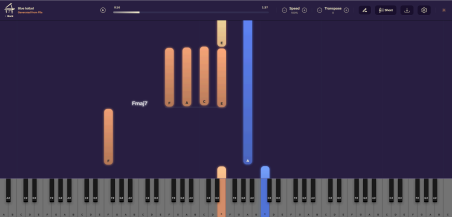
Most people first encounter piano music visually through “falling notes” , the synced piano-roll videos popular on YouTube, where colored bars descend toward a keyboard in time with the audio. That format is intuitive because it maps directly to the keys: you see exactly which notes are played and how long they’re held.
A good transcription tool gives you both views. The score tells you how the music reads; the MIDI piano roll tells you exactly how it was played, precise timing, note duration, and velocity (how hard each note was struck). Ivory keeps these synchronized, so you can click a measure in the score and jump to the same spot in the piano roll. For practice, the falling-notes view is often the faster way to learn a passage, while the score is what you keep and share.
The MIDI itself is the useful output for producers. Because the transcription is real MIDI, not a recording, you can drop it onto any instrument track in your DAW, change the sound, edit individual notes, or shift the key. The performance becomes raw material you can rebuild.
Ivory is built specifically for polyphonic piano, so it recognizes chord voicings and separates the hands automatically, with the goal of producing more readable harmonic notation for users.
Ivory runs on a freemium model, so you can test it before paying anything. The free tier lets you transcribe the first minute of any YouTube piano video, enough to see how accurate it is on music you actually care about before committing. The paid plan is $8.99 a month and lifts
the limits: full-length transcriptions, the editor, the MIDI piano roll, and all export formats without time caps. For a tool that replaces hours of manual transcription, users who regularly transcribe piano recordings may find value in the platform’s subscription model depending on their individual workflow needs.
The takeaway
Most coverage of AI in music focuses on generating new material. The more useful application is the reverse: tools that document music you already have. Transcription doesn’t replace musicianship. It removes the slow, manual step between hearing a piece and having it written down, and it puts the score back within reach for musicians who were never going to transcribe it by hand.
A note on your data
Privacy Note: Users should review Ivory’s current privacy policy, terms of service, and data handling practices directly before uploading personal, commercial, copyrighted, or unreleased content.
One difference worth calling out: According to Ivory’s published policies at the time of writing, user-uploaded audio is not used to train the company’s AI models. Some transcription and audio tools use customer recordings to improve their models, which can be a real concern if you’re uploading unreleased work, demos, or anything you don’t want absorbed into a training set. Ivory states that user uploads remain under the user’s control and are not incorporated into model-training datasets.
For producers and songwriters working on material before it’s public, that’s a meaningful distinction.
Ivory is an AI piano transcription tool that converts audio and YouTube links into sheet music, MIDI, and MusicXML. Try it free at ivory-app.com.
–
Editorial Note: Software features, pricing, export options, and product capabilities referenced in this article reflect information available at the time of publication and may change over time.