Paid Advertisement: Neural Frames paid Respect My Region to publish this article.
An independent artist might need a full music video, a vertical hook clip, and a teaser from the same single. Some AI music video generators and have tools that start with the finished track and build a sequence around it. Others are better suited to generating individual shots you can cut alongside performance footage. The difference matters when you’re paying for credits and working toward a release date.
Neural Frames, Freebeat, and Kaiber document workflows that start with audio. Runway offers tools for generating individual shots, and CapCut can help assemble footage, captions, and vertical clips. Kling AI is included as a clip-generation option, but we couldn’t verify its current model-specific limits for this comparison.
Research method: Respect My Region was provided published provider information and did not test these AI music video tools or AI music video generators hands-on. This is a feature comparison, not a ranking of output quality. Prices, credits, formats, and feature access can vary by plan, model, device, and region. “Not verified” means we couldn’t confirm a feature from the documentation reviewed.
AI Music Video Generators and Tools at a Glance
| Tool | What it’s useful for | Track-to-video workflow | Pricing and limits to check |
|---|---|---|---|
| Neural Frames | Song-based videos and vertical clips | Autopilot builds a video from a track; Vocal Video offers lip-sync for selected clips | Knight: $39 monthly or $312 annually. Neural Frames recommends Ninja for full-length Autopilot projects. |
| Freebeat | Generating a video from an uploaded song | Its documented workflow uses up to the first six minutes of a song | Basic is listed at $6.99 per week before any limited offer. Check the rate at checkout. |
| Kaiber | Generating a music-driven sequence with optional visual references | Music Video Sequence supports videos from 30 seconds to four minutes | Starter: $10 monthly or $8 per month on an annual plan. Check which workflow your plan includes. |
| Runway | Generating individual shots for a separate edit | A full-song workflow was not verified | Gen-4.5 generates clips from two to ten seconds. Its image-to-video mode supports 9:16. |
| Kling AI | Exploring individual AI-generated shots | A full-song workflow was not verified | Current model-specific pricing, duration, and export limits were not verified. |
| CapCut | Editing clips, adding captions, and creating vertical cuts | Talk or Sing can use uploaded audio with a character image. A full-song workflow was not verified. | Confirm feature availability and export options for your device and region. |
Neural Frames: From a Finished Track to a Music Video
Neural Frames describes Autopilot as a workflow that analyzes a song and builds a video around it. The company says its audio engine separates eight stems, including vocals, drums, and bass, so visuals can respond to different parts of a track. Artists can also build characters from descriptions or reference photos. The platform supports reusing saved characters, though RMR didn’t test how consistently they appear across scenes. Vocal Video adds lip-sync to selected clips.
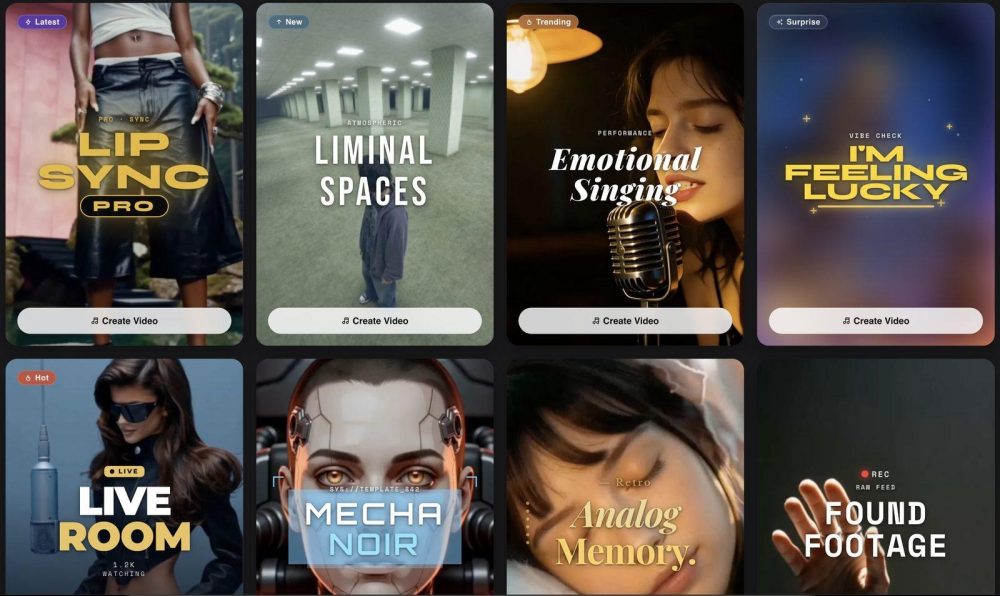
For artists who need both a main video and release-week clips, Short-Form Studio offers a vertical workflow. The Neural Frames pricing page also lists horizontal-to-vertical conversion on its paid plans. Review the reframed clip before posting: a centered face, caption, or performance detail may land differently once a wide shot is cropped.
Knight costs $39 month-to-month or $312 billed annually, equivalent to $26 per month. It includes 2,400 credits per month and 1080p upscaling.
The provider includes Autopilot on Knight but recommends Ninja for full-length Autopilot projects. Ninja costs $99 monthly or $792 annually and includes 7,200 credits per month. Nirvana costs $299 monthly or $2,388 annually and includes 24,000 credits per month. Ninja and Nirvana list 4K upscaling, which is different from native 4K generation. A plan price tells you what access costs; the length, model, and number of revisions determine how far the credits go.
Freebeat: A Song-Based Workflow With a Six-Minute Limit
The Freebeat music video guide describes a workflow that analyzes a track, generates visuals, and assembles them into a video. The guide says that if a song runs longer than six minutes, the tool uses only the first six minutes even when the full-song option is selected. Check that limit before committing to a project built around an extended mix or a long outro.
The Freebeat pricing page displays $6.99 per week for Basic alongside a limited $4.99 offer. Check the amount charged, the billing interval, and any renewal terms at checkout. A weekly rate is easy to mistake for a small monthly expense when comparing it against annual plans from other providers.
Kaiber: Music Video Sequences With Visual References
Kaiber’s Music Video Sequence guide describes videos ranging from 30 seconds to four minutes. Artists can generate from audio and a description, guide clips with reference images, or use the Restyle mode to shape the look. That makes the workflow worth examining if you already have artwork or reference images for the single.
According to Kaiber’s plan guide, Starter is $10 month-to-month or $8 per month on an annual plan and does not include Beat Sync. Compare the features on the plan you’d actually use before comparing its price with other platforms.
Runway and Kling AI: Generating Shots for a Separate Edit
Runway’s Gen-4.5 documentation lists two- to ten-second generations at 720p, with vertical 9:16 available in image-to-video mode. The model uses 12 credits per second, so a five-second generation costs 60 credits before any additional attempts. Runway also documents Act-Two as a separate character-performance tool. Check the specifications for the workflow you’re buying rather than assuming every Runway model has the same features.
Kling AI is another option to evaluate for individual clips. RMR did not verify a full-song workflow, current pricing, or model-specific duration and resolution limits for this comparison. If you’re considering it for a release, check the exact model’s specs and export options before building your schedule around it.
CapCut: Putting the Video and Social Clips Together
CapCut’s AI music video overview describes image-to-video tools and a Talk or Sing workflow that can animate a character image using uploaded audio. That feature is useful to distinguish from automatic generation of a full music video, which RMR did not verify. For an artist who already has phone footage, performance takes, or generated clips, CapCut is an option for assembling the edit and making separate versions for vertical platforms. Check which features are available on your device and in your region.
A Release-Week Workflow for Independent Artists
- Clear rights before uploading. Check that your licenses cover the planned video use of the recording, beat, composition, samples, and visual assets. Get any necessary permission before uploading someone else’s photo or replicating their likeness or voice.
- Test the hardest section first. If the concept depends on lip-sync, render the fastest bars before committing to the whole track. If it depends on the same character appearing throughout, check a few different angles and lighting conditions before spending credits on the remaining scenes.
- Cut the main video and vertical clips separately. Start with the hook or the moment that makes sense on its own. Review captions, framing, and audio on a phone before scheduling the clips.
- Check platform disclosure rules before posting. YouTube’s synthetic-content guidance calls for disclosure when content is realistically depicted and meaningfully altered or generated. Check the current rules on every platform you use.
–
Frequently Asked Questions About AI Music Video Generators
Which AI music video generator fits an artist who releases every few weeks?
Start with what you need to deliver. If you want to generate a sequence from a finished song, compare Neural Frames, Freebeat, and Kaiber. If you already have performance footage and need a few extra shots, a clip generator and an editor may be enough. Check which plan covers your required duration, aspect ratio, and number of revisions.
Can AI lip-sync a fast rap verse?
Some providers offer lip-sync or character-performance tools, but RMR did not test their accuracy on fast verses. Preview a short section with dense lyrics or quick delivery before committing to a full render. A tool advertising lip-sync doesn’t tell you how well it will handle your particular track.
How much does an AI music video cost?
There’s no fixed cost. Neural Frames lists Knight at $39 monthly or $312 annually and recommends Ninja for full-length Autopilot projects. Freebeat lists a weekly Basic plan, and Kaiber lists a monthly Starter plan with different feature access. Budget for revisions as well as the first render, and compare the price of the plan that actually supports your workflow.
Who owns an AI-generated music video?
Check the provider’s terms, your subscription, and any restrictions attached to the model or assets you used. Permission to use an output commercially is a separate question from whether you can claim exclusive copyright in it. The U.S. Copyright Office’s report on AI copyrightability explains that qualifying human contributions can be protected, including sufficiently creative selection, arrangement, or editing. Purely AI-generated material does not qualify for U.S. copyright protection on its own. Neither a paid subscription nor a provider’s output terms clear someone else’s music, footage, likeness, or voice for you.
–
For more updates on AI Music Video Generators or other AI tools for rappers and artists, subscribe to the official RespectMyRegion.com newsletter or Instagram.